Ещё не переведено
Эта страница пока недоступна на русском, поэтому показана английская версия.
Layout rule
One frame for every screen: the document never scrolls, empty slots are 0px, and drawers stay inside a pane.
- Руководства
The rule
Every screen uses the same frame from ab-nextjs-core.
- The app, the main pane and the aside are fixed-height boxes. The document does not scroll.
- The sidebar, the main content and the aside content each scroll on their own.
- A header, footer or bar that you leave empty is 0px. It is not an invisible row.
- A drawer slides inside the app, the main pane or the aside. It does not cover the browser window.
- The breakpoints are 768, 1180 and 1920. Below 1180 the aside is a drawer. From 1180 it is a pane.
variant="panes" on AbAppLayout is that frame. The default variant keeps the older stacked layout. New pages use panes.
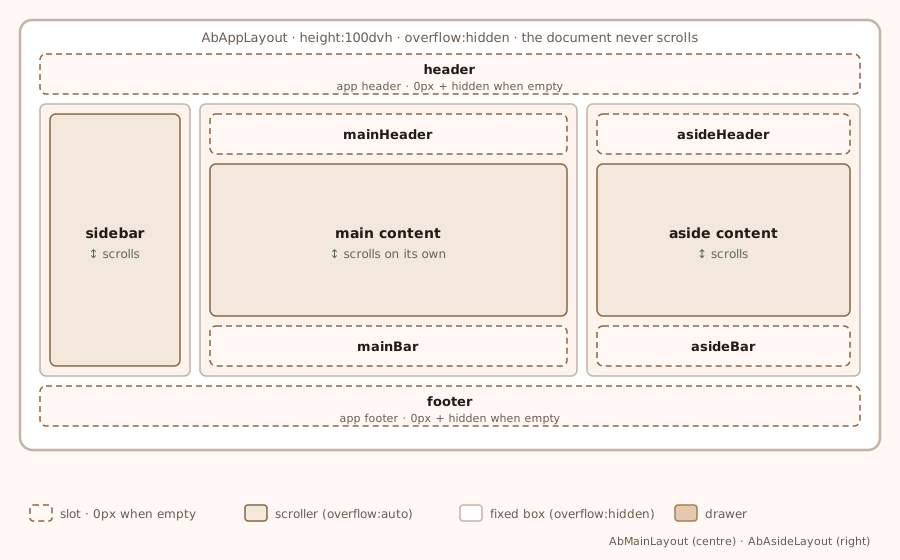
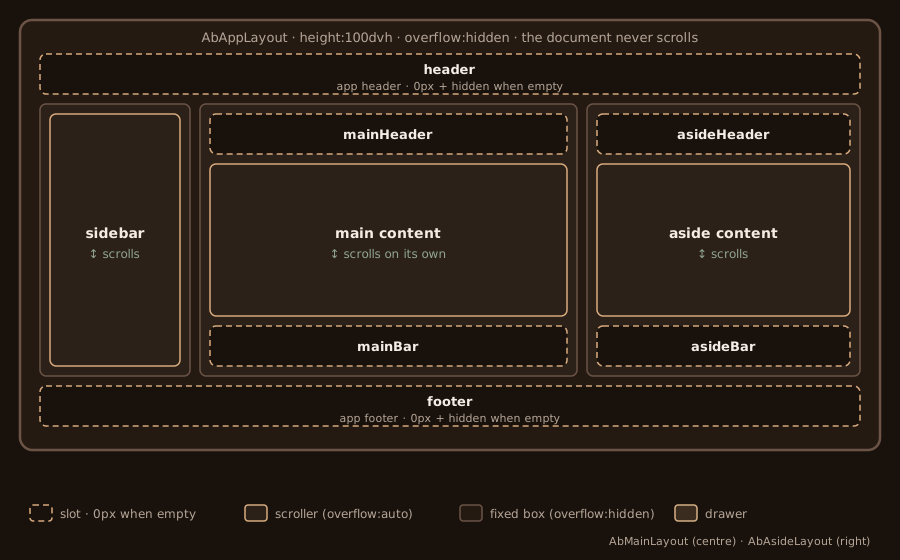
Anatomy and slots
orientation is required (vertical or horizontal). Each layout has a client file and a server twin under ab-nextjs-core/server/. The props match. Use the server twin in a Server Component.
- App header:
AbAppLayoutpropheader, partheader. Does not scroll. 0px when empty. - Sidebar:
AbAppLayoutpropsideBar, partsidebar. Scrolls on its own. - Bottom bar:
AbAppLayoutpropnavBar, partbottomBar. Does not scroll. 0px when empty. - App footer:
AbAppLayoutpropfooter, partfooter. Does not scroll. 0px when empty. - Main header:
AbMainLayoutpropmainHeader, partmain-header. Does not scroll. 0px when empty. - Main content:
AbMainLayoutchildren, partmain-content. Scrolls on its own. - Main bar:
AbMainLayoutpropmainBar, partmain-bar. Does not scroll. 0px when empty. - Aside header:
AbAsideLayoutpropasideHeader, partaside-header. Does not scroll. 0px when empty. - Aside content:
AbAsideLayoutchildren, partaside-content. Scrolls on its own. - Aside bar:
AbAsideLayoutpropasideBar, partaside-bar. Does not scroll. 0px when empty.
The older header and footer props on AbMainLayout and AbAsideLayout are deprecated aliases of mainHeader / mainBar and asideHeader / asideBar. New code uses the names in the table. The prop on the app layout is sideBar, not sidebar.
mobileHeader="main" hides the app header below 768px and shows mainHeader as the phone bar. tabletHeader="main" does the same from 768px to 1179px. mainHeaderAt="all" keeps that main header visible at every width.
import AbAppLayout from 'ab-nextjs-core/ab-app-layout';
import AbPageProvider from 'ab-nextjs-core/ab-page-provider';
import AbMainLayout from 'ab-nextjs-core/server/ab-main-layout';
import AbAsideLayout from 'ab-nextjs-core/server/ab-aside-layout';

export function Shell({ children, outline }: { children: React.ReactNode; outline: React.ReactNode }) {
  return (
    <AbPageProvider>
      <AbAppLayout orientation="vertical" variant="panes" pageName="docs" mobileHeader="main" tabletHeader="main">
        <AbMainLayout id="main" orientation="vertical" pageName="docs" mainHeader={<p>Docs</p>}>
          {children}
        </AbMainLayout>
        <AbAsideLayout orientation="vertical" pageName="docs" asideHeader={<h2>On this page</h2>}>
          {outline}
        </AbAsideLayout>
      </AbAppLayout>
    </AbPageProvider>
  );
}
Leave a slot out, or pass null, and that row is not rendered. Tests can target the scrollers with [data-ab-part="main-content"] and [data-ab-part="aside-content"].
What scrolls
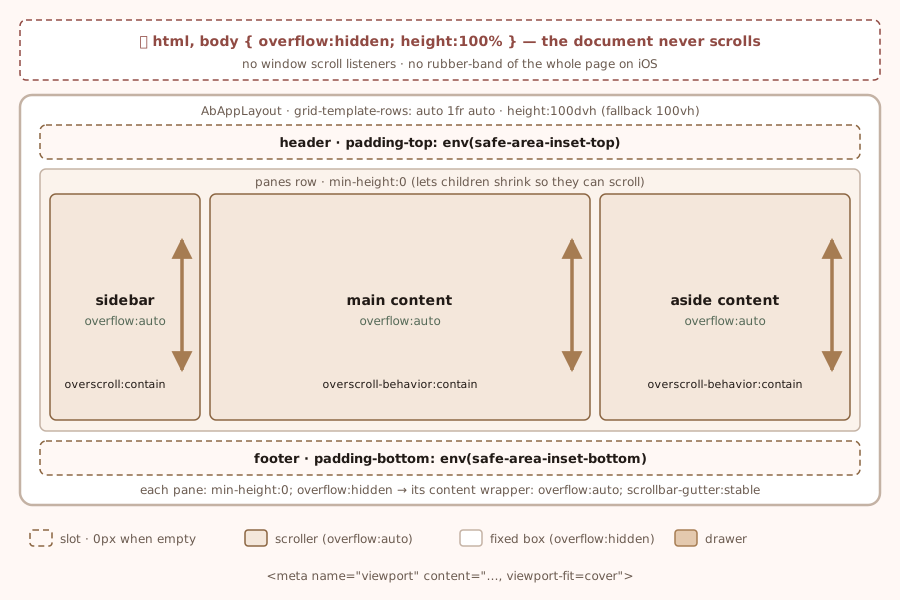
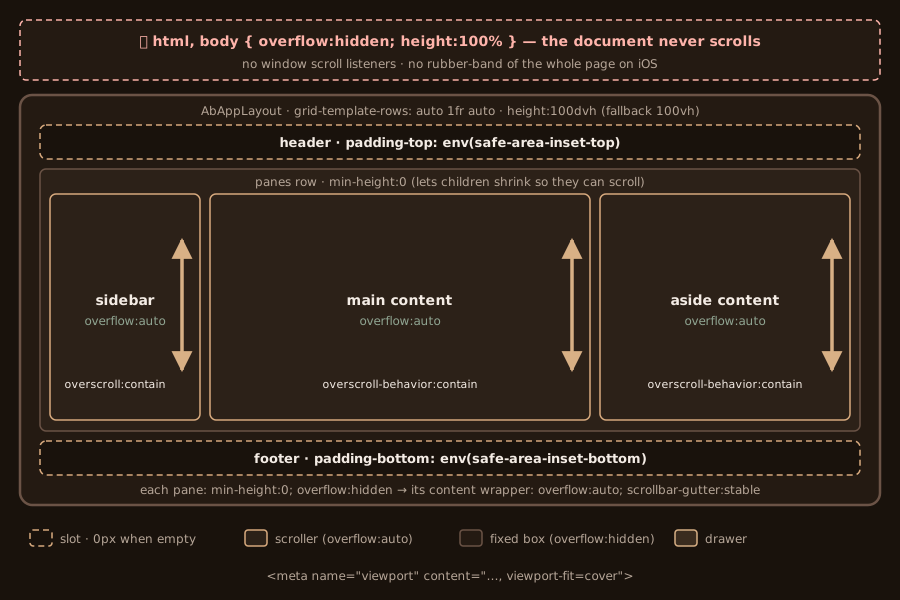
With variant="panes" mounted, the app is a 100dvh grid (auto / minmax(0, 1fr) / auto) and overflow: hidden. The package locks html and body while that layout is mounted, so the document cannot rubber-band. The lock uses :has(), and data-ab-layout-lock where :has() is missing. acquireAbLayoutLock from ab-nextjs-core/ab-app-layout counts the mounted layouts so unmounting one of two keeps the lock.
Each content scroller uses overflow: auto, scrollbar-gutter: stable and overscroll-behavior: contain. A grid or flex child that must scroll also needs min-height: 0. The package sets that on the panes. If you add your own grid inside a pane, set it there too, or the child grows with its content and never scrolls.
The header, footer and bars pad with env(safe-area-inset-*). Those insets are 0 unless the viewport sets viewport-fit=cover.
There is no --ab-app-bar-height offset and no padding-top: 64px to clear a fixed bar. The grid row is auto. Empty means 0px.
Empty slots
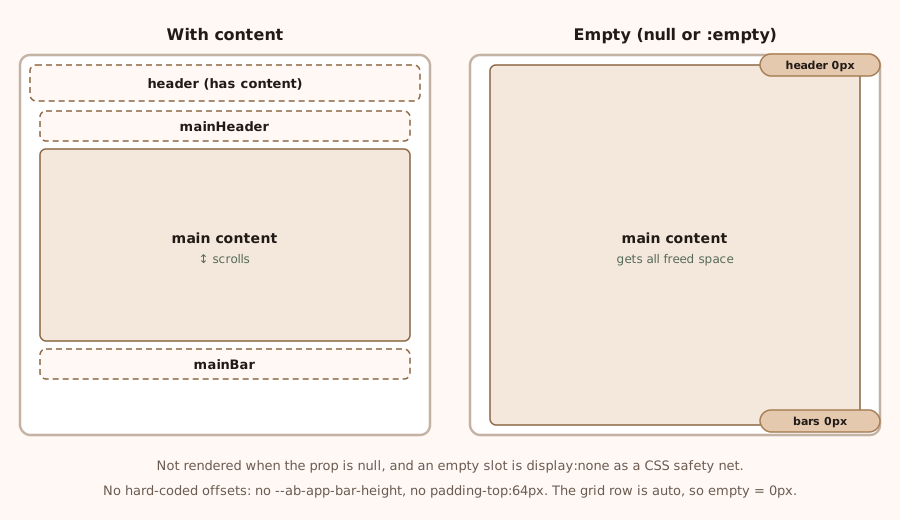
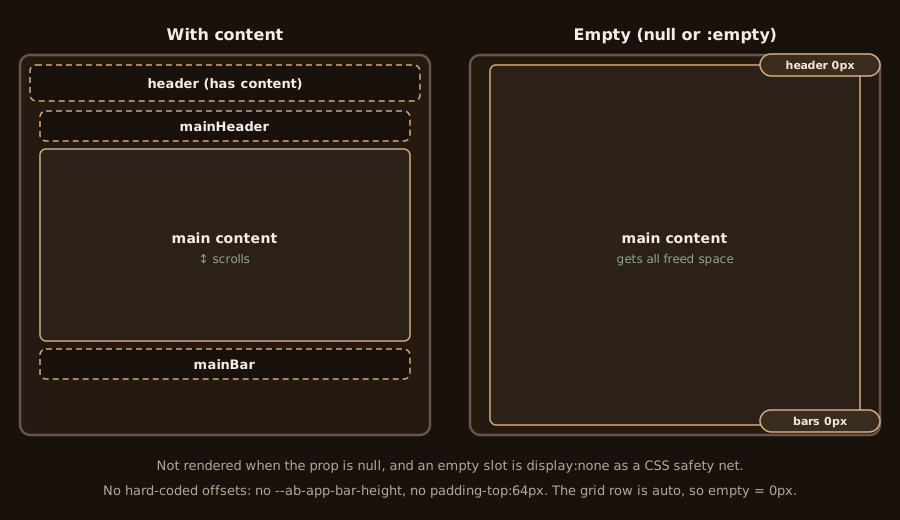
Two layers hide an empty slot:
- The layout does not render the wrapper for
null,undefined,false,''or an empty array. - A CSS rule collapses a slot that rendered but has no element children.
Do not render an empty <div> to keep a row. Omit the prop.
Drawers
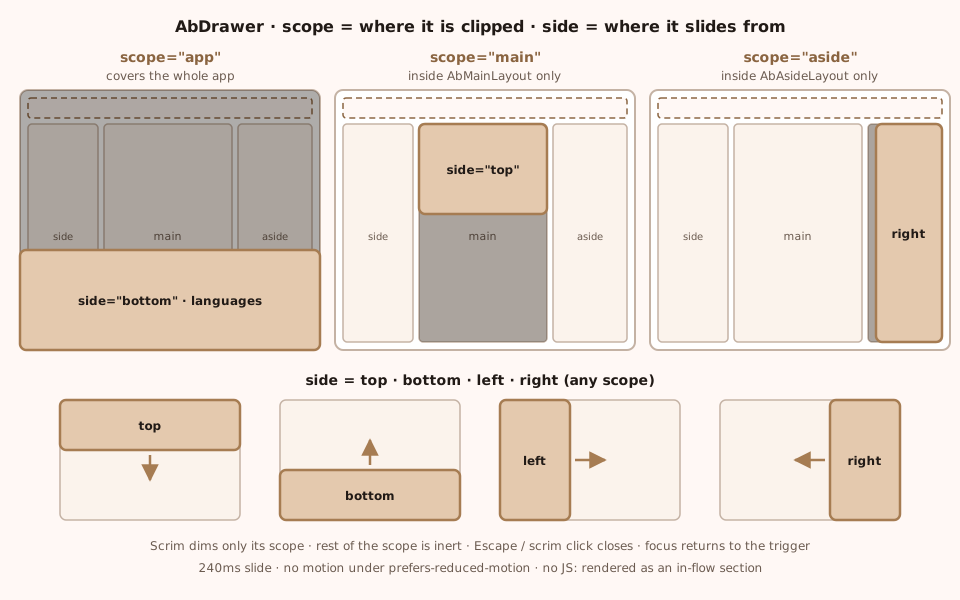
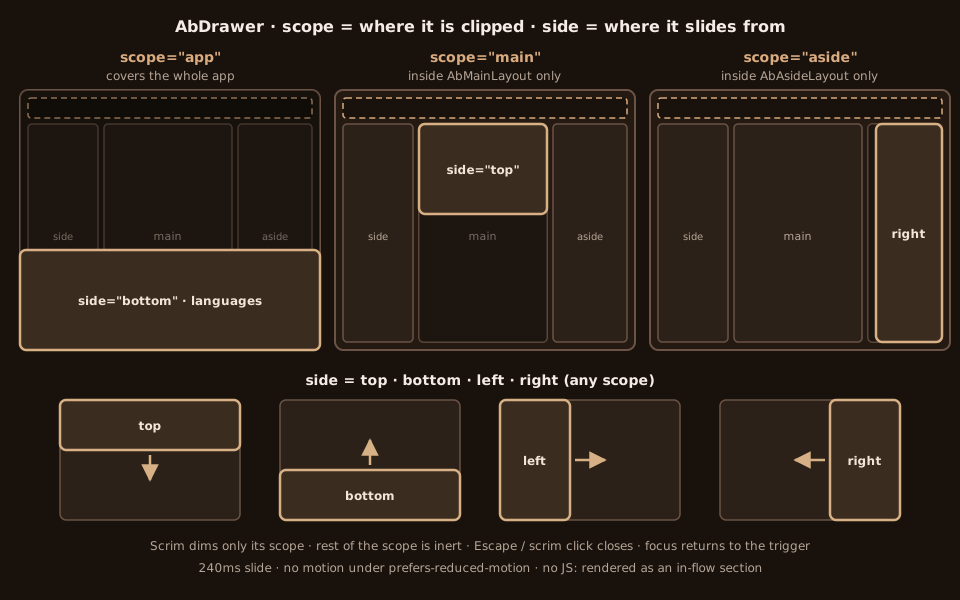
AbDrawer and useAbDrawer are published from ab-nextjs-components/ab-drawer. AbDrawerList is the selectable list, from ab-nextjs-components/ab-drawer-list.
scope is app, main or aside. It chooses the box that clips the drawer. side is top, bottom, left, right, start or end. start and end follow the writing direction.
useAbDrawer(scope) returns open, show, close, toggle, triggerProps and drawerProps. Spread drawerProps onto the drawer and triggerProps onto the button. Focus return is handled by AbDrawer.
'use client';

import AbDrawerList from 'ab-nextjs-components/ab-drawer-list';
import { useAbDrawer } from 'ab-nextjs-components/ab-drawer';

export function LanguageDrawer() {
  const drawer = useAbDrawer('app');
  return (
    <>
      <button type="button" {...drawer.triggerProps}>Language</button>
      <AbDrawerList
        {...drawer.drawerProps}
        side="bottom"
        title="Language"
        items={[
          { value: 'en', label: 'English' },
          { value: 'fr', label: 'Français', lang: 'fr' },
          { value: 'es', label: 'Español', lang: 'es' },
          { value: 'ru', label: 'Русский', lang: 'ru' },
        ]}
      />
    </>
  );
}
Every drawer:
- It is a dialog.
titlebecomes the heading that names it, or setaria-labelledby/aria-labelyourself. - Focus moves in on open and returns to the trigger on close.
- Escape closes it. So does the scrim. Both call
onClose. - With
modal(the default), the rest of that scope is inert. Not the whole app, unlessscope="app". - The slide is
AB_DRAWER_DURATION(240ms). Reduced motion removes it. noJsFallback(the default) renders the content in the page flow when JavaScript has not run.
tier stacks drawers: aside, then nav, then sheet. Product drawers (navigation, outline, search, settings) are separate components. Their props are on the Drawer page.
- Drawer: a list or form that belongs to a region, or that needs room on a small screen.
- Menu: a short list anchored to a button.
- Dialog: a blocking decision about the whole app, not tied to one region.
Breakpoints
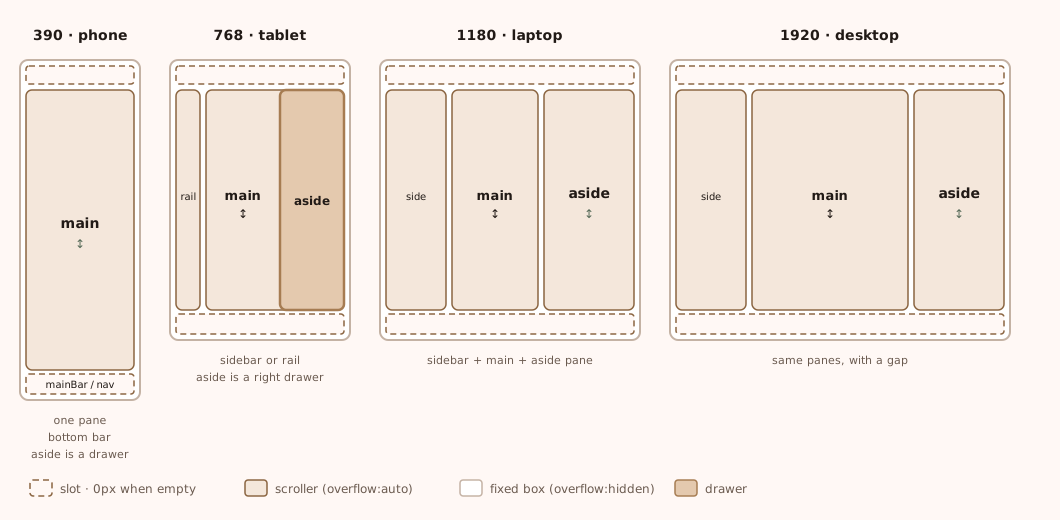
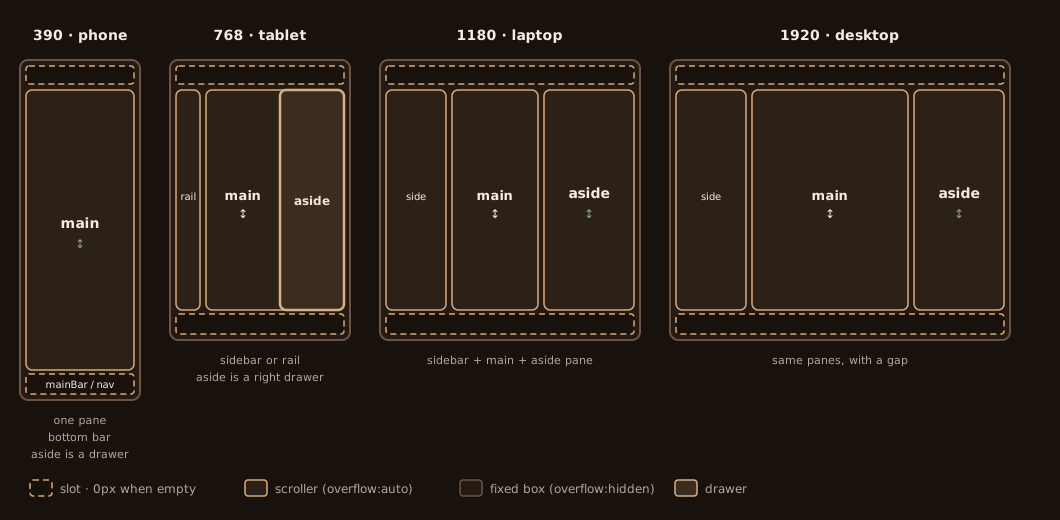
- 390. The bottom bar, or a drawer, replaces the sidebar. Main is the one visible pane. The aside is a drawer.
- 768. The sidebar (or the rail) and main are visible. The aside is a right drawer.
- 1180. The full sidebar, main, and the aside pane sit side by side.
- 1920. The same three panes, with a gap.
The document never scrolls at any width. Check 390, 768, 1180 and 1920 in light and dark.
AB_ASIDE_SHEET_QUERY from ab-nextjs-core/ab-page-provider is (max-width: 1179px). Below that, the aside is a sheet. useAbAsideToggle picks the sheet or the pane and returns aria-expanded, aria-controls and onClick.
Scroll spy and anchors
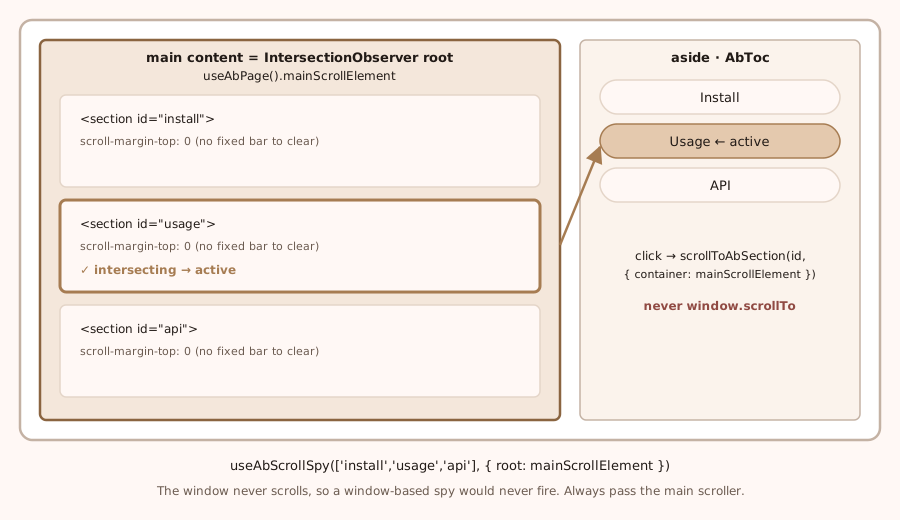
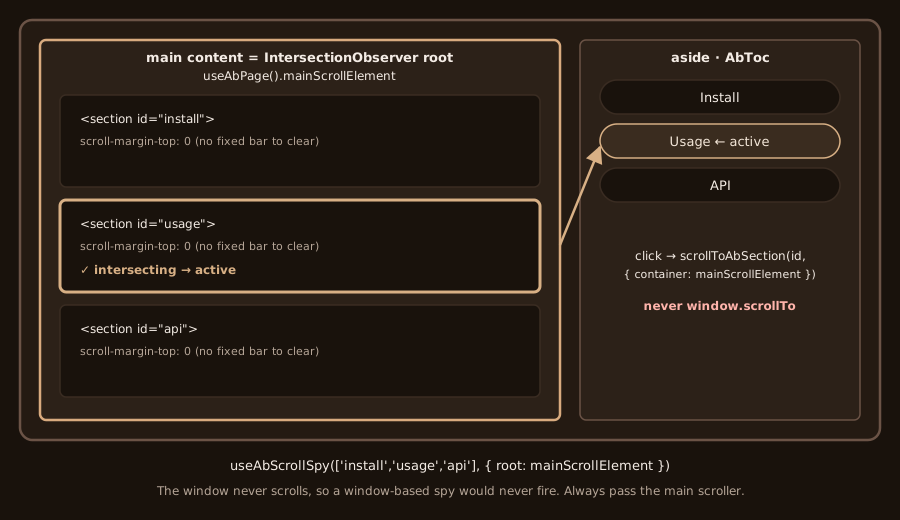
The window never scrolls, so a listener on window never fires. Pass the main scroller.
'use client';

import { useAbPage } from 'ab-nextjs-core/ab-page-provider';
import { scrollToAbSection, useAbScrollSpy } from 'ab-nextjs-hooks/useAbScrollSpy';

const ids = ['anatomy-and-slots', 'what-scrolls'];

export function Outline() {
  const { mainScrollElement } = useAbPage();
  const activeId = useAbScrollSpy(ids, { root: mainScrollElement });
  return (
    <a
      href={`#${activeId ?? ids[0]}`}
      aria-current={activeId ? 'location' : undefined}
      onClick={(event) => {
        event.preventDefault();
        scrollToAbSection(activeId ?? ids[0], { container: mainScrollElement });
      }}
    >
      On this page
    </a>
  );
}
useAbScrollSpy takes the ids first, then options. root is the scroller (useAbPage().mainScrollElement). With a root, the default rootMargin is AB_SCROLL_SPY_PANE_ROOT_MARGIN (0px 0px -60% 0px). lastAtBottom defaults to true: the last id wins when that scroller is at the bottom. The window's margin is AB_SCROLL_SPY_ROOT_MARGIN (-64px 0px -60% 0px). Do not use that margin inside a pane. The bar is outside the pane.
scrollToAbSection(id, { container }) scrolls that element. container is the option. root on this function is a deprecated alias of container. The call is instant when the reader prefers reduced motion.
getAbMainScroller from ab-nextjs-components/ab-toc reads [data-ab-part="main-content"]. Call it in an effect or an event handler, never during render.
'use client';

import { useEffect, useState } from 'react';
import { getAbMainScroller } from 'ab-nextjs-components/ab-toc';

export function MainScrollerLabel() {
  const [ready, setReady] = useState(false);
  useEffect(() => { setReady(getAbMainScroller() != null); }, []);
  return <span>{ready ? 'main' : ''}</span>;
}
AbToc uses the main scroller when you pass onNavigate through to scrollToAbSection. A plain href="#id" still works without JavaScript. Keep scroll-margin-top small. No fixed bar sits over the pane's content. A sticky heading inside main uses top: 0, which is the top of main, not the top of the viewport.
Welcome
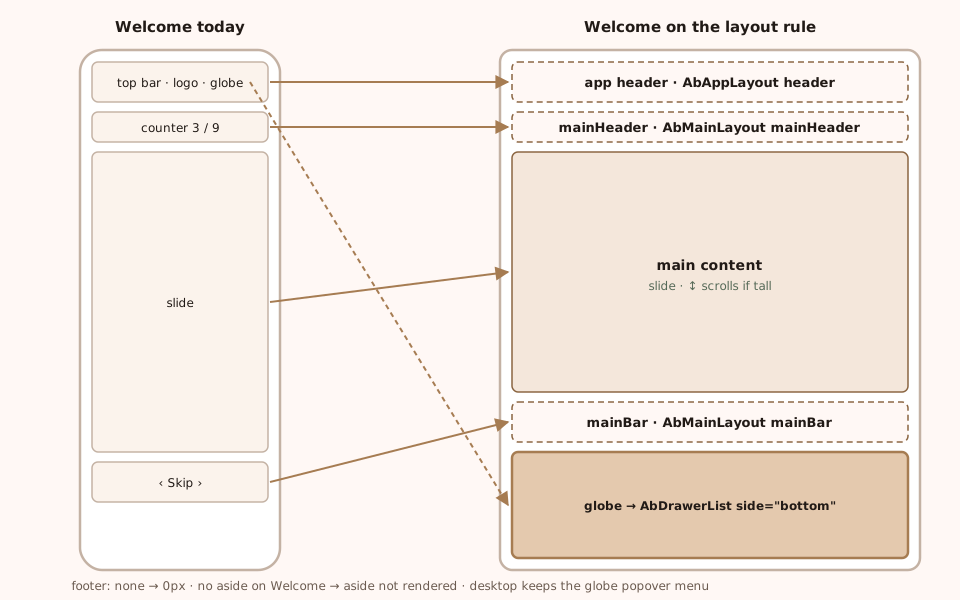
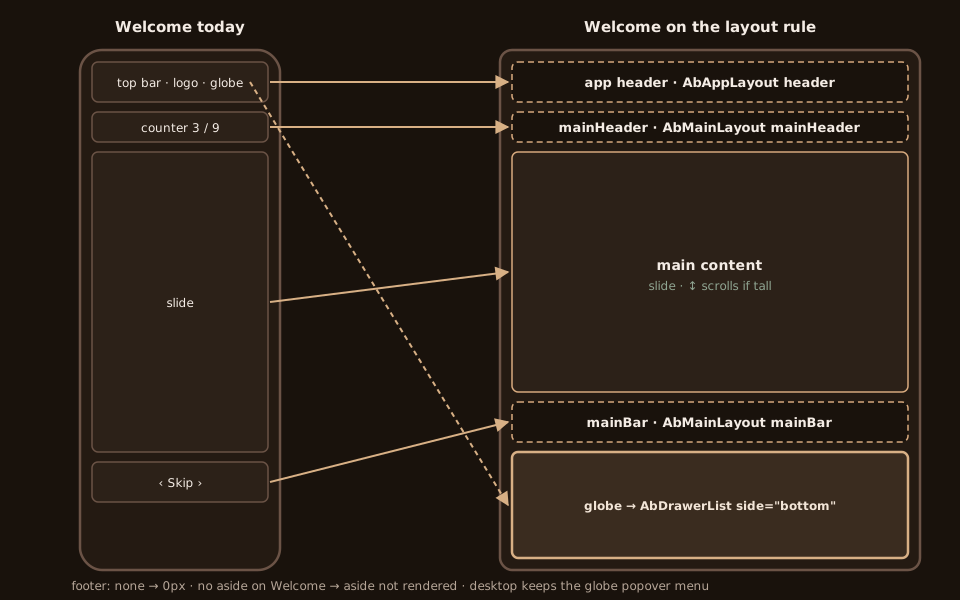
Welcome is already on this frame (pageName="welcome").
- Top bar (logo, theme, globe):
AbAppLayoutheader. A banner landmark inside the slot. No hand-built fixed bar. - Phone bar:
AbMainLayoutmainHeader, withmobileHeader="main". The counter lives in main. - Slide: main content. It scrolls only when the slide is taller than the pane.
- Dots, arrows, and Skip:
AbMainLayoutmainBar, withmainBarPin="always"andmainBarLabel. Not an app footer. - Playground:
AbAsideLayout. A pane from 1180px.asideBelow="inline-in-main"joins it to main's scroller from 768px to 1179px.asideDrawerAt="mobile"makes that same element a right drawer below 768px. - Globe below 768px:
AbDrawerList,side="bottom", real locale links. From 768px the globe is a menu. - Sidebar and app footer: omitted, so 0px.
surface="page" paints the welcome surface from the theme tokens on every pane.
Do, don't, and the checklist
- Put chrome in
header,mainHeader,mainBar,asideHeader,asideBar,navBar, orfooter. Do not build a bar withposition: fixed. - Omit an empty slot, or pass
null. Do not render an empty<div>to reserve space. - Scroll with
scrollToAbSection(id, { container }). Do not callwindow.scrollTo, and do not listen towindowscroll. - Use
AbDrawerwith the scope that owns the UI. Do not cover the viewport withposition: fixedfor a regional drawer. - Let the grid row stay
auto. Do not hard-code a bar height (64px,--ab-app-bar-height). - Set
min-height: 0on a grid or flex child that must scroll. Do not rely on100vhalone.
Before you open a pull request:
- The page uses
AbAppLayoutandAbMainLayout, andAbAsideLayoutwhen it has an outline. - The document never scrolls. Only the panes scroll, and they scroll independently.
- An empty header, bar or footer measures 0px.
- No
position: fixedpage chrome, nowindowscroll listener, no hard-coded bar height. - Drawers use the right
scopeandside, trap focus, close on Escape and the scrim, and honour reduced motion and the no-JavaScript fallback. - Checked at 390, 768, 1180 and 1920, in light and dark.
- New labels exist for en, fr, es and ru.